
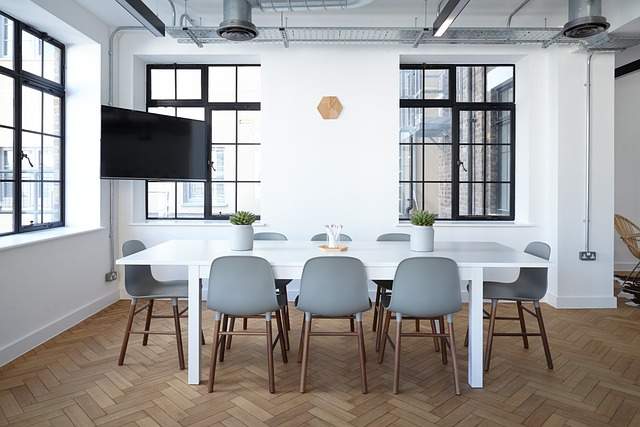
In the fast-paced world of business, meetings serve as pivotal moments for collaboration, decision-making, and strategic discussions. Recognizing the unique requirements of various gatherings, organizations are increasingly focusing on setting up and customizing meeting rooms to cater to specific needs. Whether it’s a creative brainstorming session, a client presentation, a training session or a virtual conference, the design and functionality of a meeting space can significantly impact the success of the event. In this comprehensive guide, we will delve into the intricacies of creating versatile, professional meeting rooms and spaces that align with different objectives, fostering productivity, engagement, and seamless interaction.
The Foundation: Understanding Meeting Room Types
Meeting spaces, venues and rooms come in various types, each with unique spaces designed to cater to specific needs and purposes. Here are some of the most common types of meeting spaces and rooms:
- Boardroom:
- Purpose: High-level discussions, decision-making, and strategic planning.
- Features: Meeting rooms with a large table with executive chairs, advanced audiovisual equipment, high speed internet capabilities, comfortable seating, and a formal atmosphere.
- Conference Room:
- Purpose: Team discussions, presentations, workshops, and client meetings.
- Features: Fully equipped meeting rooms with large table or multiple tables, chairs, audiovisual equipment (projectors, screens), video conferencing technology, on site cafes and a comfortable and professional environment for a conference room to rent
- Huddle Room:
- Purpose: Quick discussions, brainstorming sessions, informal collaboration, interviewing candidates
- Features: Small space with a table and a few chairs, interactive whiteboards, hybrid meetings capabilities, informal and flexible setup.
- Training Room:
- Purpose: Workshops, training sessions, skill development, presentations.
- Features: Meeting rooms with ample space for participants, modular furniture, audiovisual equipment, interactive displays, training materials, and a conducive learning environment.
- Auditorium:
- Purpose: Large-scale presentations, conferences, seminars, and keynote speeches.
- Features: Tiered seating, stage area, high-quality audiovisual equipment, fully equipped large screens, podium, and capacity for a significant number of attendees.
- Training Rooms:
- Purpose: Small group discussions, private conversations, focused work.
- Features: Small table, chairs, audiovisual equipment (if needed), quiet atmosphere, and privacy.
- Collaboration Room:
- Purpose: Creative brainstorming, collaborative work, team projects, training rooms.
- Features: Flexible seating arrangements, writable walls, interactive displays, comfortable furniture, and tools for visual collaboration.
- Video Conferencing Room:
- Purpose: Virtual meeting rooms with remote participants.
- Features: High-quality video conferencing equipment, cameras, microphones, screens, and comfortable seating for in-person participants.
- Hybrid Meeting Room:
- Purpose: Combining in-person and remote participants in a single meeting.
- Features: Video conferencing technology, cameras, microphones, screens, and an environment that facilitates seamless interaction between on-site and virtual attendees.
- Podcast Studio:
- Purpose: Recording podcasts, interviews, webinars, and audio content.
- Features: Soundproofing, high-quality microphones, audio recording equipment, comfortable seating, and an environment conducive to clear audio recording.
- Focus Room:
- Purpose: Individual work, private phone calls, concentration, annual appraisals, top notch meeting
- Features: Quiet space, comfortable seating, minimal distractions, and a suitable environment for focused tasks
- Lounge Area:
- Purpose: Meeting venue for an informal board meeting, a client meeting, casual meetings, relaxation.
- Features: Comfortable seating, coffee tables, a cozy ambiance, and a laid-back atmosphere.
- Virtual Meeting Room:
- Purpose: Virtual collaboration and communication among remote participants.
- Features: Video conferencing technology, screens, cameras, microphones, and interactive tools for virtual interaction.
The choice of meeting room type depends on the specific objectives, number of participants, and nature of the discussions or activities of next meeting that will take place. Customizing the meeting room to suit the intended purpose enhances productivity, engagement, and overall cost effectiveness of hosting the meetings.
Step 1: Assessing Needs and Objectives
The first step in setting up the perfect space for a customized meeting room is to identify the specific needs and objectives of the event space and the meetings that will be held there. Consider the following factors:
- Meeting Size: Determine the average number of participants to ensure sufficient seating and space.
- Technology Requirements: Identify the technology needed, such as projectors, screens, video conferencing systems, and audio equipment.
- Collaboration Tools: Decide on interactive whiteboards, digital displays, and tools for virtual collaboration.
- Ambiance: Consider lighting, acoustics, and overall ambiance to create a conducive environment.
- Furniture: Choose ergonomic and adaptable furniture that suits the type of meetings to be conducted.
Step 2: Layout and Furniture
The layout of the spaces in the meeting room plays a pivotal role in facilitating communication and engagement. Depending on the meeting space and type of event, consider different seating arrangements:
- U-Shape: Ideal for small group discussions and presentations, allowing everyone to see each other and the presenter.
- Theater Style: Best for larger audiences and presentations, with rows of chairs facing a stage or screen.
- Round Table: Promotes discussion and collaboration among participants, perfect for brainstorming sessions.
- Cluster Seating: Offers flexibility for dynamic discussions, often combined with interactive technology.
Ensure that the furniture is ergonomic and comfortable to keep participants, clients and guests engaged and focused during lengthy meetings.
Step 3: Technology Integration
In the digital age, technology integration is a cornerstone of effective meeting rooms and board meetings. Consider the following meeting rooms tech essentials:
- Audiovisual Equipment: Invest in high-quality projectors, screens, and audio systems to ensure clear presentations and communication.
- Video Conferencing: Set up reliable video conferencing systems for remote participants, enabling seamless virtual collaboration.
- Interactive Displays: Interactive whiteboards and touchscreen displays foster dynamic brainstorming and collaboration.
- Wireless Connectivity: Provide fast and secure Wi-Fi for attendees to access online resources and collaborate digitally.
- Cable Management: Implement cable management solutions to prevent clutter and ensure a tidy workspace.
Step 4: Lighting and Acoustics
Lighting and acoustics play a crucial role in creating a conducive and productive environment within a meeting room. Considering these factors is essential to ensure clear communication, reduce distractions during team meetings, and enhance the overall quality of the team meeting experience. Here are some key considerations for lighting and acoustics in a meeting room:
Lighting Considerations:
- Natural Light:
- Whenever possible, maximize the use of natural light. It helps create a comfortable and inviting atmosphere, reduces eye strain, and enhances participants’ mood and focus.
- Artificial Lighting:
- Choose adjustable lighting fixtures that allow you to control the intensity and color temperature of the light. Warm white light can create a cozy ambiance, while cooler white light is more suitable for focused work.
- Dimming Controls:
- Install dimming controls to adjust the light level based on the meeting’s needs. Dimming can help set the mood and save energy.
- Uniformity:
- Aim for even lighting distribution across the room to prevent harsh shadows and ensure that everyone is adequately illuminated.
- Lighting Control Systems:
- Implement smart lighting systems that allow you to pre-set lighting scenes or adjust them on the fly using automation or mobile apps.
Acoustics Considerations:
- Noise Control:
- Choose materials that absorb and reduce noise, such as acoustic panels, carpets, curtains, and upholstered furniture. This prevents sound from bouncing and echoing, creating a quieter environment.
- Furniture and Layout:
- Arrange furniture and seating in a way that supports good acoustics. Avoid overcrowding and maintain adequate spacing between participants.
- Background Noise:
- Consider the potential sources of background noise, such as HVAC systems or nearby activities, and take measures to mitigate their impact.
- Meeting Room Shape:
- The room’s shape can affect acoustics. Rectangular or oval-shaped rooms tend to have better sound distribution compared to irregularly shaped rooms.
- Testing and Adjustments:
- Test the room’s acoustics with a trial meeting or presentation and make necessary adjustments based on the feedback received.
Balancing proper lighting and acoustics ensures that participants in meeting rooms and venue can engage effectively in discussions, presentations, and a range of collaborative activities. By addressing these considerations, you can create a meeting room or venue that fosters clear communication, minimizes distractions, and enhances the overall meeting experience
Step 5: Collaboration Tools
Engagement and collaboration are enhanced through the integration of digital services and tools:
- Whiteboards: Traditional or digital whiteboards facilitate idea sharing and visual explanations.
- Collaboration Software: Implement software for virtual collaboration, document sharing, and real-time editing.
- Remote Participation Tools: Provide tools for remote participants to actively engage, ask questions, and contribute.
Step 6: Branding and Aesthetics
Customizing the meeting room to reflect your organization’s branding, office location and office culture adds a personal touch:
- Branded Signage: Display your company logo and branding elements prominently.
- Colors and Decor: Incorporate your company’s color palette and design elements into the room’s decor.
- Artwork: Choose artwork that aligns with your brand identity and creates a pleasant atmosphere.
Step 7: Flexibility and Adaptability
Versatility is key when setting up meeting rooms. Ensure that the room can be easily reconfigured to accommodate different meeting types. Invest in modular furniture and technology solutions for conference rooms that can adapt to various meeting rooms and setups.
Step 8: Accessibility and Inclusivity
Create an inclusive business environment by considering business accessibility needs:
- Wheelchair Access: Ensure that the room is wheelchair accessible and features appropriate seating.
- Visual Impairment: Provide materials in large font and ensure good lighting.
- Hearing Impairment: Incorporate captioning services and induction loops for hearing aid users.
Step 9: Testing and Optimization
Before rolling out the conference rooms or venue facilities for actual use, conduct thorough testing to identify any technical glitches, lighting issues, or acoustic problems. Fine-tune the technology, lighting, and seating arrangements to optimize the room or venue’s functionality.
Conclusion
The process of setting up and customizing meeting rooms for specific needs involves a meticulous blend of design, technology, and functionality. As businesses continue to evolve and embrace diverse modes of collaboration, the meeting room stands as a hub of innovation and communication. By tailoring the environment to cater to the unique demands of a host of different meetings, organizations can unlock the full potential of their teams and foster meaningful interactions that drive success. Whether it’s the perfect setting to host a high-stakes boardroom discussion or host a creative brainstorming session, well-designed meeting rooms lay the foundation for productive and impactful meetings that propel businesses forward.


